Why the usual ways don't work
The long email. It's written in agency language — "we moved the PMax campaign to a tCPA of 450 and added 38 negatives from the search terms report" — for a reader who thinks in leads and money. The client skims it, doesn't feel confident saying yes, and asks for a call.
The status call. Thirty minutes on a calendar for three minutes of actual content, scheduled two days out, with half the context forgotten by the time it happens. Multiply by every client, every week.
The dashboard link. "Everything's in Looker Studio" assumes the client will open it, find the right chart and interpret it the way you did. Most don't.
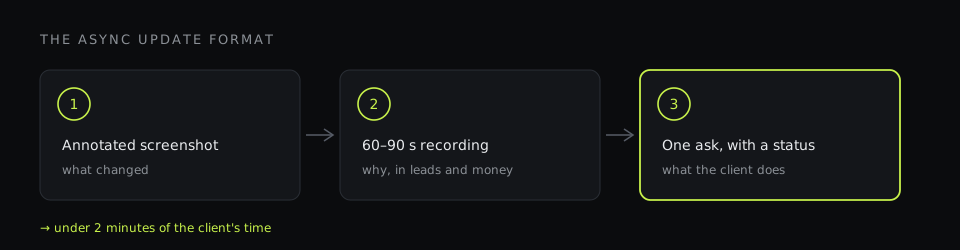
What clients actually want is simple: what changed, why, what it means for them, and what — if anything — they need to do. The format below answers those four questions in under two minutes of their time.
The format: screenshot, short video, one ask
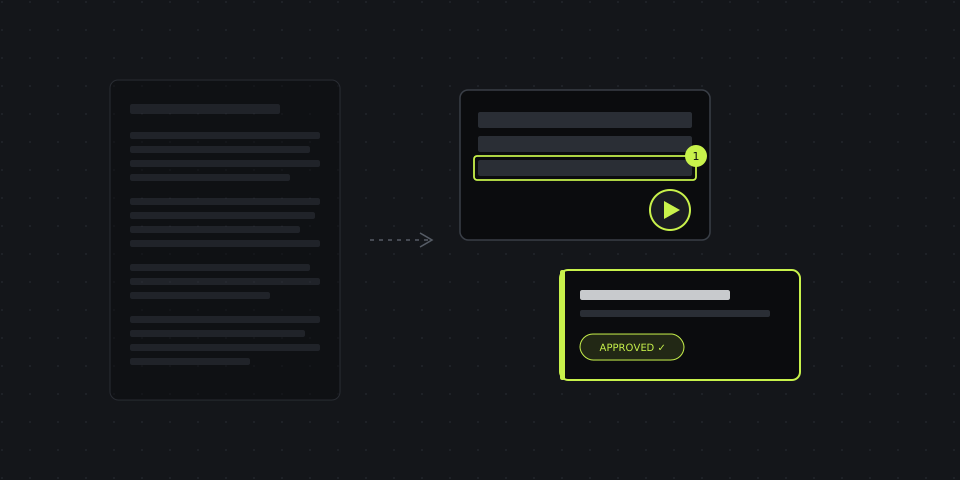
1. An annotated screenshot of the change
Start with what they can see. A screenshot of the campaign, the report or the landing page, with the change marked: an arrow to the budget column, a box around the new negative keywords, a numbered callout on each section of the page you're recommending to change. Pixelate anything they shouldn't forward — other clients' names in the account switcher, internal notes, cost data they don't need.
A good screenshot answers "what changed?" on its own. One or two marks per screenshot; if you need more, split it into two.
2. A 60–90 second screen recording explaining why
Then the "why", in your voice, over your screen. Walk through the numbers that led to the decision: "Here's last month's cost per lead by campaign. This one is at 900, this one at 380. We moved 30% of the budget from the first to the second." Turn the camera on — clients trust a face more than a paragraph.
Keep it under two minutes. If it's longer, you're explaining more than one change; record separate videos so each one can be forwarded to the person it concerns.
3. One clear ask, with a status
End with exactly one thing the client needs to do, or an explicit "nothing needed, this is for your information". Approve the new budget split. Send the updated price list for the feed. Confirm the promo dates. If the ask is a task, send it as a task: a link with the description, a deadline, and a status the client can set — "approved", "in progress", "done" — without logging into anything.
A worked example: shifting budget between campaigns
Here's what a real update looks like for a common change.
- Screenshot: the campaigns table, last 30 days, with an arrow pointing from the expensive campaign's budget to the efficient one and a callout: "1 — cost per lead 900 → we reduce budget by 30%", "2 — cost per lead 380 → we add that budget here".
- Video (75 seconds): "Hi Olena, quick update on the account. Over the last month, the shopping campaign brought leads at 380 per lead, while Performance Max was at 900. Same products, same landing pages. We're moving 30% of the PMax budget to shopping from Monday. Total spend stays the same. We'll check in two weeks whether the overall cost per lead went down — I expect around 15–20%."
- Ask: "Nothing needed from you — just so you know why the numbers in the next report shift. If you'd rather keep PMax at the current level, reply here before Monday."
Total client time: under two minutes. No call scheduled. The decision and its reasoning are on record, which helps months later when someone asks why the budget looks the way it does.
Templates for the changes you explain most often
| Change | Screenshot | Video explains | Ask |
|---|---|---|---|
| Budget reallocation | Campaign table, cost per result marked | Which campaign is more efficient and the expected effect | Usually FYI, or approve if total spend changes |
| New negative keywords | Search terms report, wasted queries boxed | What irrelevant searches were costing | FYI; ask to flag any term that is actually relevant |
| Bid strategy change | Settings before/after | Why now, the learning period, what to expect in week 1–2 | Approve; agree not to judge results in the learning period |
| Landing page recommendation | Full-page screenshot, numbered callouts per section | What hurts conversion and the fix for each point | Task for the client's developer with a deadline |
| Tracking issue | Conversion report with the gap marked | What's broken, the impact on optimization | Task with exact steps, often for a third party |
| Feed / product problem | Merchant Center diagnostics, disapproved items | Which products are out and why | Task: send updated prices or fix product data |
How this looks in DashShot
DashShot is our product — we built it partly because of this exact workflow. Each step of the format maps to a feature:
- Screenshot: press the hotkey, select the area of Google Ads or the report, mark it up with arrows, numbered callouts and pixelation, and the link is already in your clipboard. For landing pages, the Chrome extension captures the whole scrolling page.
- Video: record a region of the screen with the camera bubble on, cut out the false starts, and send the link. The client watches in the browser, without an account. You can see whether they watched and how much.
- Ask: record a voice note — "send me the new price list for the autumn promo by Thursday" — and DashShot turns it into a structured task with a deadline and a link where the client sets a status and replies in comments.
- Per-client history: tasks are grouped into projects, one per client, so you can see what's waiting on whom across the whole agency.
For agencies that want it, share pages can carry your own logo and colors instead of ours. See DashShot for agencies and client communication for more scenarios.
Rules that make async updates work
- Lead with the outcome, not the action. "Cost per lead should drop about 15%" before "we changed the tCPA".
- Use their numbers. Leads, sales, revenue, cost per lead — not CTR and impression share, unless they asked.
- One change per message. Bundled updates get bundled questions and delayed answers.
- One ask per message. And say explicitly when there's no ask.
- Keep a rhythm. A short weekly change log is better than an occasional long report. Clients worry less when they hear from you regularly.
- Keep calls for real decisions. Strategy, quarterly plans, big budget changes, bad news — those deserve a conversation. Routine changes don't.
What changes when you stop explaining by email
In our experience, two things happen. Fewer "can we jump on a call?" replies — clients approve faster when they've seen the screen and heard the reasoning. And fewer misunderstandings months later, because every change has a screenshot, a recording and a status attached, instead of a line in an email thread nobody can find. The time saved goes back into the accounts, which is where clients want it spent anyway.