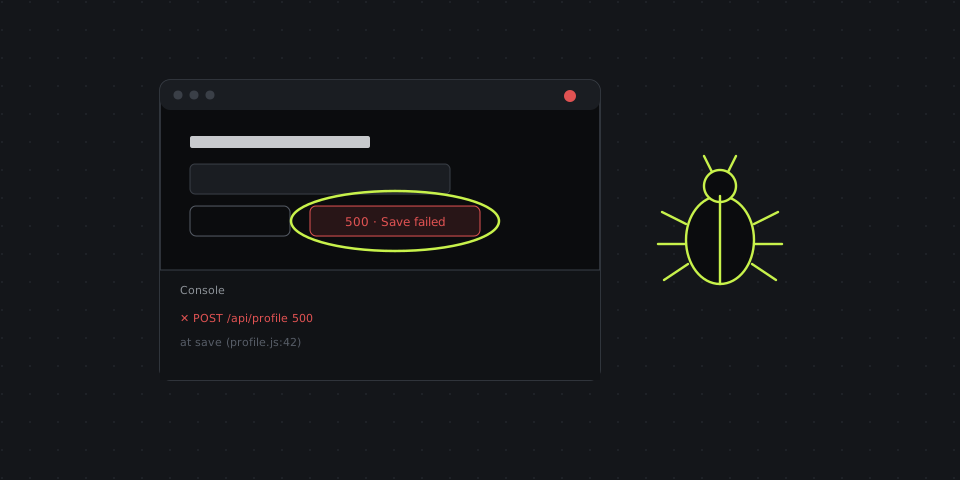
Why text-only bug reports fail
Written steps to reproduce look complete to the person who wrote them, because they already know what happened. The developer reading them doesn't. "Click Save on the profile page" leaves out that you'd changed the email first, that the request took eight seconds, and that the error flashed for half a second before the page reloaded.
A recording captures all of that by default: the exact sequence of clicks, the timing, the state of the page before the bug, the error message, and often the detail nobody thought to write down. That's why teams that add video to bug reports see fewer "cannot reproduce" closures and fewer comment threads asking for more information.
Video doesn't replace the written report, though. Developers search tickets by text, triage by severity, and need the environment details a video doesn't show. The best bug reports combine both.
A bug report template that pairs text with video
| Field | What to write |
|---|---|
| Title | What's broken and where: "Saving profile with a new email shows 500 error" |
| Environment | Browser and version, OS, device, app version or build, account/role, test or production |
| Steps to reproduce | Numbered, starting from a known state: "1. Log in as a regular user 2. Open Profile 3. Change email 4. Click Save" |
| Expected result | What should happen |
| Actual result | What happens instead, with the exact error text |
| Frequency | Always, sometimes (how often), once |
| Severity | Blocker, major, minor, cosmetic — and who is affected |
| Recording | Link to a 20–60 second video of the bug happening |
| Screenshot | The broken state with the problem circled or numbered |
| Logs | Console errors, failed network request, request ID if there is one |
The expected-versus-actual pair is the heart of the report. If you can't say clearly what should have happened, the developer can't tell whether it's a bug or a misunderstanding of the feature.
How to record a bug that developers can actually use
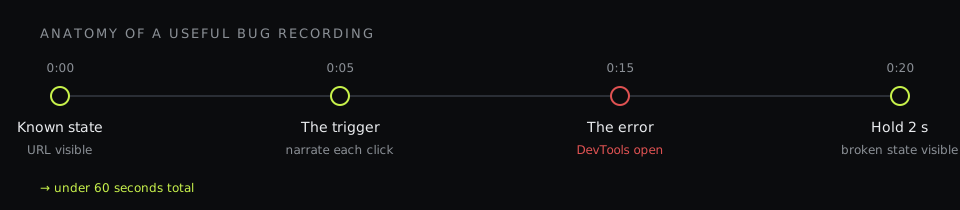
- Reproduce it once before recording. Make sure you know the steps. A recording of you hunting for the bug is five times longer than one of you triggering it.
- Start from a known state. Begin the recording on a page the developer recognizes, with the URL visible — not halfway through a flow.
- Record the right area. The browser window or the app window, not your whole 4K desktop with Slack and email visible. A region recording keeps it focused and avoids leaking unrelated data.
- Open DevTools if it's a web bug. With the Console or Network tab visible, the recording captures the red error or the failed request at the exact moment the bug happens.
- Narrate briefly. "I'm changing the email, clicking Save — and here's the 500." Your voice tells the developer what you expected at each step. Turn on the microphone, keep it short.
- Pause on the broken state. Hold still for two seconds when the bug appears so it's visible without frame-by-frame scrubbing.
- Keep it under a minute. Cut the waiting and the false starts. If the bug needs a long setup, describe the setup in text and record only the trigger.
Screenshots: still the fastest way to report visual bugs
For layout and copy problems — overlapping elements, a wrong font, a cut-off button on mobile, a typo — a video is overkill. An annotated screenshot is faster to make and faster to read:
- Circle or box the broken element; add a numbered callout if there are several problems.
- Add one line of text on the image if the problem isn't obvious: "should be aligned with the price".
- For responsive bugs, capture the viewport where it breaks and say the width.
- For long pages, use a full-page screenshot so the developer sees where on the page the problem is.
- Pixelate customer data, tokens, emails and anything else that shouldn't sit in a ticket forever.
Video, GIF or screenshot?
- Screenshot — static visual bugs: layout, styling, copy, wrong data on a page.
- GIF (up to ~10 seconds) — short interaction bugs: a hover state, a broken animation, a dropdown that closes too early. GIFs autoplay inside GitHub, Jira and Linear, so the developer sees the bug without opening anything.
- Video with voice — anything with several steps, timing, or where your explanation matters: flows, race conditions, intermittent errors.
How QA teams use DashShot for bug reports
DashShot is our product; here's how it fits this workflow specifically.
- Screenshots: a hotkey, select the area, mark it up with arrows, boxes and numbered callouts, pixelate sensitive data — the link is in your clipboard to paste into the ticket. The Chrome extension also captures full scrolling pages and web apps that scroll inside a panel.
- Recordings: record a region, a window or a tab with your microphone, cut out the waiting, and paste the link. Developers open it in the browser without an account. GIF recordings up to 12 seconds for short interactions.
- Reports from your voice: describe the bug out loud after recording it — what you did, what you expected, what happened — and DashShot turns it into a structured task with context, expected result and success criteria. The developer gets a link with a status and comments.
- Step-by-step docs from a video: for complex reproduction paths, DashShot can turn a recording into a page of screenshots with descriptions for each step.
Screenshots are free, and the free plan also records up to 5 minutes per video and includes 10 AI actions a month for voice tasks and docs; Pro removes those limits. See screen recording and screenshots for details.
Common mistakes that make bug recordings useless
- Recording without the URL or environment visible. The developer has to ask which page and which build.
- Five minutes of video for a ten-second bug. Nobody scrubs through it; trim before sending.
- No sound when it matters. If the bug is "this took too long", say how long it normally takes.
- Video instead of text, not alongside it. The title, steps and expected/actual still go in the ticket so it's searchable.
- Sensitive data in frame. Production customer records, API keys in DevTools, internal chats in the corner. Record a region and pixelate screenshots.
- Attaching a 200 MB file. Trackers choke on large uploads; a link is lighter and plays instantly.
The payoff
A good bug recording takes a minute longer to make than a text-only report and saves the developer ten minutes of reproducing, plus the round-trip of questions. Over a sprint, that adds up to days. More importantly, bugs get fixed the first time, because the person fixing them saw exactly what the person reporting them saw.